

Schema Markup for Local Businesses: How Structured Data Helps You Get Found in Google and AI Search

Two plumbing companies in the same city can publish nearly identical pages. One shows up in Google with star ratings, opening hours, and interactive FAQs. The other shows up in a basic text link. The difference usually is not authority, backlinks, or content length. It is that one of them told search engines what the page actually contains in a standardized code format that search engines and AI platforms read natively.
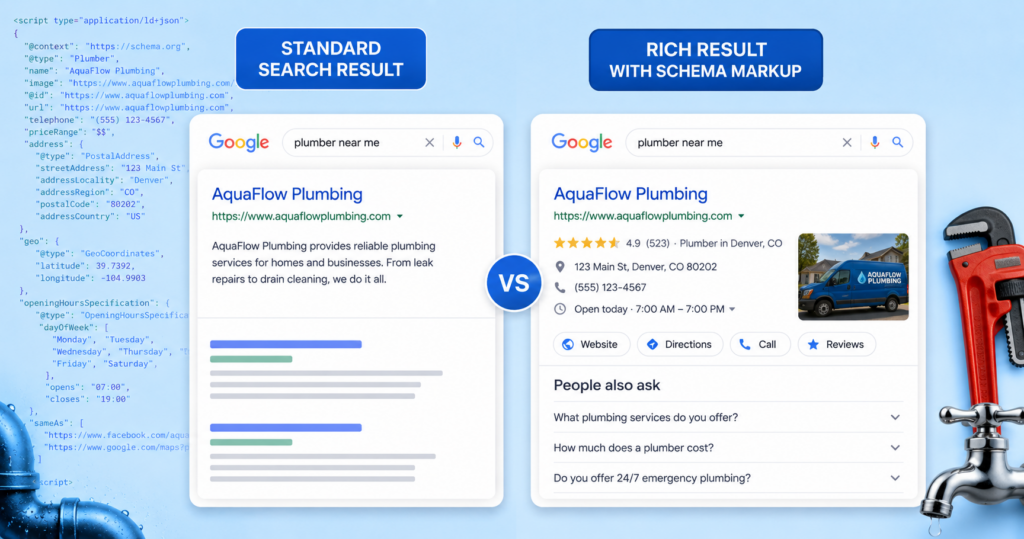
That language is structured data, and the vocabulary is called schema. Despite being one of the oldest tools in technical SEO, it remains one of the most misunderstood. Now that AI overviews and ChatGPT and Perplexity answer questions that used to send clicks directly to websites, it is a vital mechanism for ensuring your content is accurately crawled, indexed, and referenced by AI-driven search engines.
This guide covers what schema markup for local businesses actually does, which types are worth your time, and how to implement and validate it without hiring a developer. Read on to learn more.
What Structured Data Actually Does (and What It Doesn’t)
Let us kill the biggest myth immediately: schema markup is not a ranking factor. Google has stated this repeatedly. Adding local business schema markup to your homepage will not move you from position 14 to position 4 on its own. What it does instead is arguably more useful. Structured data does two jobs:
It Makes You Eligible For Rich Results: Star ratings, FAQ dropdowns, breadcrumb trails, event listings, and product pricing in search results are gated behind valid markup. No schema, no eligibility. That is not a ranking boost, but a listing that occupies three times the vertical space and displays a 4.9-star rating earns clicks that a plain link does not.
It Ensures Clarity: Your page might say “Serving the metro since 1998.” A human reads that as a founding year and a service area. A crawler sees a string of characters. Structured data lets you state explicitly: this is an organization, it was founded in 1998, it serves these cities, it offers these services, it is open these hours, and it has this many reviews, averaging this score.
That second job is where structured data SEO has quietly changed. Ranking factors are about competition. Comprehension is about being usable—and when a language model assembles an answer about “best HVAC companies in Overland Park,” it needs to understand your entity well enough to include you in the set. Ambiguity gets you excluded before ranking ever enters the conversation.
If your technical foundation is shaky elsewhere, fix that first. Our guide to Mastering Technical SEO and our breakdown of Core Web Vitals both cover prerequisites that markup cannot compensate for.
The Schema Types Local Businesses Should Prioritize
Schema.org lists over 800 types. You need roughly five. Here is what actually earns its place on a local site.
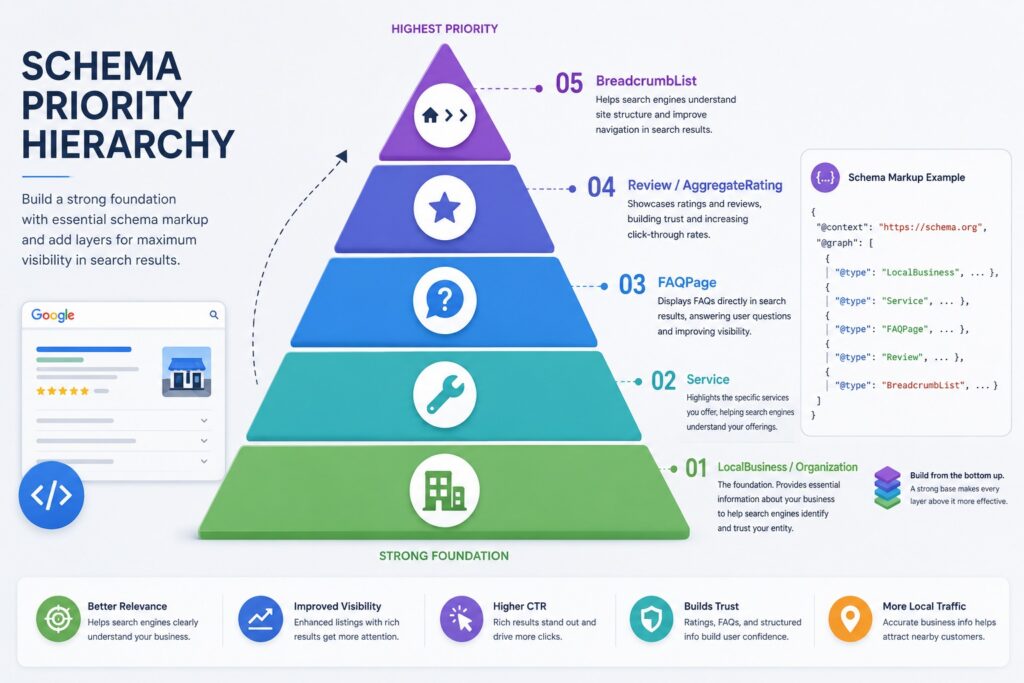
Local Business and Organization
This is the starting point. The local business schema tells search engines the basics about your business—your name, address, phone number, location coordinates, business hours, price range, and social media profile. If Google has a specific category for your exact business type, use it instead of the generic one. Your website’s NAP details must match your Google Business Profile character for character. Inconsistent data between your site’s schema markup and your official profile sends negative trust signals to search engines.
Service and Offer
Your service pages should carry service markup describing what you provide, the geographic area you provide it in, and who provides it. Service schemas are underused by local businesses. It maps directly to commercial search queries. If you have a page for a specific offering, use service markup with the exact name, a short description, the service area, and a link to your main business.
FAQPage and HowTo
The FAQ schema takes the questions already on your page and makes them machine-readable. Google has narrowed FAQ-rich result display considerably, so treat the visual dropdowns as a bonus rather than the goal. The real value now is that clean question-and-answer pairs are the single most extractable content format for AI systems—you are handing over pre-formatted answer blocks. Only mark up questions and answers that are genuinely visible on the page. Marking up hidden content is a violation.
Review and Aggregate Rating
This one carries a rule people constantly break: you cannot mark up reviews you collected yourself and display on your own site for your own business in a way that generates star ratings for the organization. Google stopped showing these self-serving review snippets years ago. AggregateRating still has legitimate uses on products and services, and reviews remain enormously valuable for conversion and for how AI tools summarize your reputation—just do not expect stars in the SERP for self-hosted testimonials.
BreadcrumbList
The least glamorous and one of the highest hit rates. Breadcrumb markup replaces the ugly URL string in your search listing with a readable hierarchy, and it reinforces your site architecture. It takes ten minutes and applies to every page.
A Copy-and-Paste JSON-LD Example for a Service Business
JSON-LD structured data is Google’s recommended format. JSON-LD is basically a hidden info card attached to your page. Google reads it easily, but it stays completely out of sight and never disturbs how your site actually looks to visitors.
Here is a complete block for a single-location service business. Replace every value with your own, including the coordinates, which you should pull from your actual Google Maps listing rather than reusing the example. Days you are closed are simply omitted from opening hoursSpecification.
| <script type=”application/ld+json”>
{ “@context”: “https://schema.org”, “@type”: “Plumber”, “@id”: “https://example.com/#organization”, “name”: “Example Plumbing Co.”, “url”: “https://example.com/”, “logo”: “https://example.com/images/logo.png”, “image”: “https://example.com/images/storefront.jpg”, “telephone”: “+1-816-555-0142”, “priceRange”: “$$”, “foundingDate”: “1998-01-01”, “address”: { “@type”: “PostalAddress”, “streetAddress”: “123 Example Street”, “addressLocality”: “Kansas City”, “addressRegion”: “MO”, “postalCode”: “64106”, “addressCountry”: “US” }, “geo”: { “@type”: “GeoCoordinates”, “latitude”: 39.0997, “longitude”: -94.5786 }, “openingHoursSpecification”: [ { “@type”: “OpeningHoursSpecification”, “dayOfWeek”: [“Monday”,”Tuesday”,”Wednesday”,”Thursday”,”Friday”], “opens”: “07:00”, “closes”: “18:00” }, { “@type”: “OpeningHoursSpecification”, “dayOfWeek”: [“Saturday”], “opens”: “08:00”, “closes”: “14:00” } ], “areaServed”: [ { “@type”: “City”, “name”: “Kansas City” }, { “@type”: “City”, “name”: “Overland Park” } ], “sameAs”: [ “https://www.facebook.com/exampleplumbing”, “https://www.linkedin.com/company/exampleplumbing” ] } </script> |
On an individual service page, add a second block referencing the organization above:
| <script type=”application/ld+json”>
{ “@context”: “https://schema.org”, “@type”: “Service”, “@id”: “https://example.com/services/water-heater-repair/#service”, “name”: “Emergency Water Heater Repair”, “serviceType”: “Water heater repair”, “provider”: { “@type”: “Plumber”, “@id”: “https://example.com/#organization” }, “areaServed”: { “@type”: “City”, “name”: “Kansas City” }, “description”: “24/7 emergency water heater diagnosis and repair.”, “url”: “https://example.com/services/water-heater-repair/” } </script> |
Notice the @id value. That single identifier lets you reference the same entity across every page without repeating the full block, and it is how you build a connected entity graph instead of a pile of disconnected snippets. Including “@type” alongside “@id” in the provider reference is not strictly required, but it parses more reliably across tools.
Multi-Location and Franchise Schema Considerations
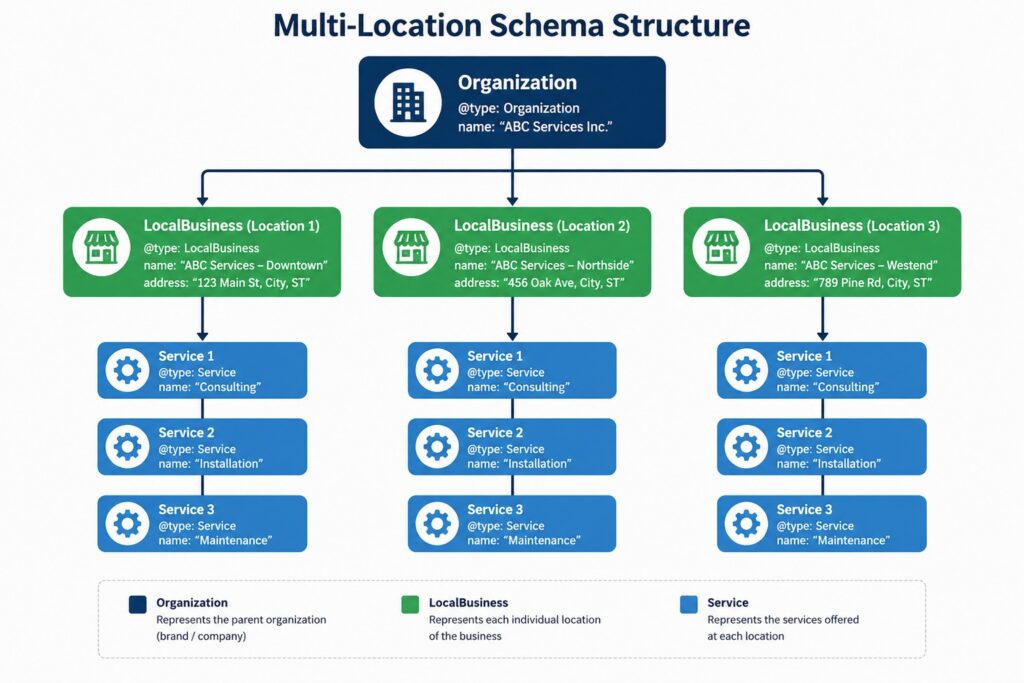
Multi-location businesses get this wrong constantly by putting every location into one homepage block.
The correct pattern is one organization entity for the brand and a separate local business entity on each location page, each with its own @id, address, phone, hours, and coordinates, linked upward via parent organization. One location page, one location entity, one unique phone number. If three branches share a tracking number, you have told Google they are the same place.
Specialized industries are worth a caution here. Schema.org does not have a type for every business category people assume it does. For example, there is no “assisted living” or “nursing home” type in the vocabulary, despite what a lot of guides claim. The practical approach is to use the closest real type (local business or medical business for care-delivery settings) and then add an additionalType property pointing to a Wikipedia or Wikidata URI that names the category precisely. You can also layer on amenity features and describe care levels, floor plans, and on-site offerings. The more precise the type, the less guessing a machine has to do—which matters enormously for high-consideration, high-trust verticals.
How Structured Data Feeds AI Overviews and LLM Answers
Here is the honest version of “Does schema help AI search?” because there is a lot of overconfident nonsense circulating.
No major AI system has confirmed structured data as a direct input to answer generation. ChatGPT, Perplexity, Claude, and Google’s AI Overviews all primarily consume rendered page content. If someone tells you schema is a guaranteed ticket into AI answers, they are selling something.
Here’s what we actually know for sure, and it’s still worth paying attention to. AI systems need to figure out exactly which business they’re talking about. For example, they need to know that “Plumbing” in Kansas City is one specific company with one specific set of details—not a random mix-up with another business of the same name.
Structured data is the clearest, most direct way to give AI that information. And since Google’s Knowledge Graph (which pulls from structured data) plays a role in feeding AI overviews, having an accurate schema genuinely helps. On top of that, FAQ schema organizes your content into clear question-and-answer pairs, a format that’s easy to pull from and quote, even if the markup itself isn’t directly read.
Schema isn’t some magic trick that guarantees AI will feature you. But it’s a small effort that makes a big difference in how clearly you’re understood. Businesses that describe themselves clearly get represented accurately. And those that don’t can get left out completely. Our post on optimizing for AI Overviews covers the content side of the same problem.
How to Implement Schema in WordPress
You can add schema markup to your website using three main methods. Each option has different benefits and affects how easily search engines can access your data.
Plugins: Rank Math and Yoast build a schema graph for you automatically and let you assign types per page. For most single-location businesses this is sufficient and takes an afternoon. Schema Pro and WP Schema offer deeper customization.
Google Tag Manager: Deploy a custom HTML tag containing your JSON-LD, fired on the relevant pages. This works and requires no theme edits but relies on JavaScript execution. It is acceptable for Google, but other crawlers might miss it. Use it only for a short time.
Direct Injection: Add the block to your theme’s header via a child theme or a code snippets plugin. The code sits in the raw HTML file. Every single crawler can read it right away. This is the top choice for large or complex sites.
Whichever you choose, pick one system only. Do not mix plugins with manually added tags. Mixing systems creates messy data, and it is the most common issue we find on audits.
How to Test, Validate, and Monitor Markup
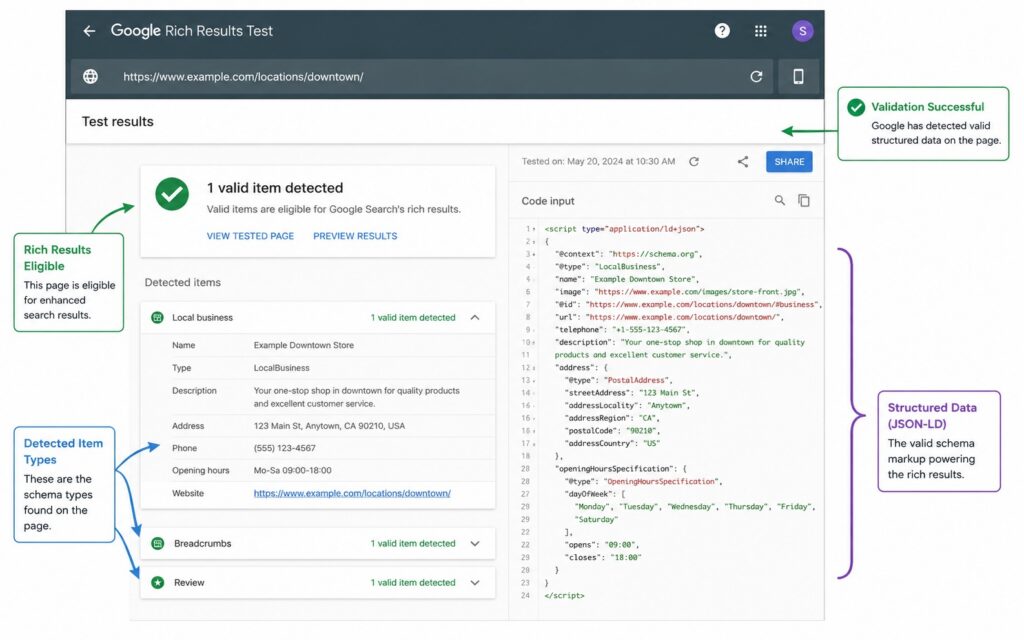
Three tools, three purposes:
- Google’s Rich Results Test: Tells you whether your markup qualifies for a rich result. This is the one that matters commercially.
- Schema Markup Validator: Checks syntax and vocabulary correctness without Google’s eligibility filter. Useful for types Google does not surface.
- Google Search Console: The Enhancements reports show errors and warnings across your whole site at scale, tracked over time. Set a monthly check.
Seven Schema Mistakes That Get Markup Ignored
- Marking Up Content That Is Not On the Page: Do not hide text in code just to trick search engines. If visitors look at your page, they must see the exact information you put in code.
- Self-Serving Review Markup: Google will not show star ratings in search results if the business marks up reviews of itself on its own website. The review must come from an outside trusted source.
- Mismatches NAP Details: Avoid local SEO errors by making your business data match. Your Google Business Profile, website, feet, and schema code must display the same NAP details.
- Duplicate Conflicting Blocks: Don’t have two different schema blocks (like one from a plugin and one you added manually) trying to describe the same thing with different information. When this happens, they contradict each other, and Google may end up ignoring both.
- Copy-Paste Without Editing: When copying schema code from a template or example, always update it with your actual business details. Many websites accidentally leave placeholder text, which confuses search engines instead of helping them.
- Overly Generic Types: Don’t settle for the general LocalBusiness category if a more specific one exists for your industry, like dentist, law firm, or assisted living facility. Using the exact category gives search engines additional clarity about who you are.
- Set-and-Forget: Your business details change over time, such as business hours, phone numbers, and location. If you add schema once and never update it, outdated information can actually hurt you more than having no schema at all.
Frequently Asked Questions
Does schema markup improve rankings?
Not directly. It makes you eligible for rich results and helps search engines understand your business, both of which can improve click-through rate and visibility.
How long until rich results appear?
Usually within days of the page being recrawled and processed, though it can take longer. Validation confirms eligibility, not display. Google decides whether and when to show an enhancement.
Do I need a schema on every page?
No. Prioritize the homepage, location pages, and service pages. Breadcrumb markup is the one type worth applying sitewide.
Can I add schema without a developer?
Yes. A plugin like Rank Math or Yoast handles standard local business cases entirely through the WordPress admin.
Does structured data help ChatGPT and Perplexity find my business?
Indirectly. These systems read rendered content, but structured data reduces ambiguity about your entity and feeds knowledge graphs that AI answers draw on.
Getting It Right the First Time
But it doesn’t ignore small mistakes; even a missing bracket or a mismatched phone number can quietly break the whole thing, and you won’t get any warning that it failed. Most businesses either skip schema altogether or trust an automatic tool without checking the results.
Salt Rank builds and audits structured data as part of every technical engagement, from single-location service businesses to multi-market franchise systems. If you would rather have it done correctly than done twice, take a look at our SEO services in Kansas City or our AI search optimization services. Contact us today and we will tell you what your markup currently says about you.
Share This Story, Choose Your Platform!
About the Author: Lauren Smith
